Help Center
-
Knowledge Base
-
-
-
- Articles coming soon
-
- Home
- Install Settings
- Merchandising
- Personalize
- Category
- NLP
- Script-Hooks
- Analytics
- Manage Users
- Agentic Search (AI-Powered Conversational Search)
- AI Synonyms
- Semantic Search
- AI Shop Assistant (Chat Widget)
- Recommendations Widget
- Advanced Filtering & Filter Trees
- Troubleshooting Guide
- Search Performance Optimization
- BigCommerce Search Integration
- WooCommerce Search Integration
- Getting Started with eCommerce Search
- Ecom Copilot (AI Sales Assistant)
- AI Filtering (Query Tagging and Intent Classification)
- Visual Merchandising (Product Pinning)
- Geo Merchandising
- A/B Testing
- Showcase Products (Zero-Character Search)
- Delete Products from Search Index
- Landing Pages
- Autocomplete Configuration
- Popular Suggestion Queries
- Tab Views
- Theme Setup
- Search Bar Integration
- Search Redirects
- Advanced Configuration (Search Weights)
- Matching Options
- Connect BigCommerce
- GDPR and Privacy Settings (Cookie Consent)
- Image Search (Visual Search)
- Smart Notifications (Back-in-Stock and Price Drop Alerts)
- Leverage GA4 Data (Google Analytics 4 Integration)
- Manage Users (Dashboard Access and Permissions)
- Reporting Overview
- Show all articles (28) Collapse Articles
-
-
- Install Settings
- Analytics
- Search settings
- Merchandising
- Category
- NLP
- Search-API info
- Manage Users
- Script-Hooks
- Personalize
- Agentic Search (AI-Powered Conversational Search)
- AI Synonyms
- Semantic Search
- Recommendations Widget
- Advanced Filtering & Filter Trees
- Troubleshooting Guide
- Search Performance Optimization
- WooCommerce Search Integration
- Show all articles (3) Collapse Articles
-
-
- Instructions to install app
- Home
- Install Settings [Shopify]
- Category
- Merchandising
- Search settings
- NLP
- Analytics
- Search-API info
- Manage Users
- Script-Hooks
- Personalize
- Agentic Search (AI-Powered Conversational Search)
- AI Synonyms
- Semantic Search
- AI Shop Assistant (Chat Widget)
- Recommendations Widget
- Commerce MCP Server (Shopify AI Tools)
- Advanced Filtering & Filter Trees
- Troubleshooting Guide
- Search Performance Optimization
- Ecom Copilot (AI Sales Assistant)
- Search Bar Integration
- Search Redirects
- Metafields and Tags (Shopify)
- Product Bundles (Shopify)
- Collection Pages (Shopify)
- GDPR and Privacy Settings (Cookie Consent)
- Image Search (Visual Search)
- Smart Notifications (Back-in-Stock and Price Drop Alerts)
- Leverage GA4 Data (Google Analytics 4 Integration)
- Manage Users (Dashboard Access and Permissions)
- Reporting Overview
- Show all articles (18) Collapse Articles
-
- Getting started
- Installation Guide
- Magento 2 Search Integration - Adobe Commerce edition
- Commerce MCP Server (Shopify AI Tools)
- BigCommerce Search Integration
- WooCommerce Search Integration
- Getting Started with eCommerce Search
- Connect BigCommerce
- Domain Allowlist (WordPress)
- Leverage GA4 Data (Google Analytics 4 Integration)
-
- Articles coming soon
-
Search Layout
Layout
Search Layout dictates the layout of the search results page.
There are two options-
- Overlay mode
- Search results on another page.
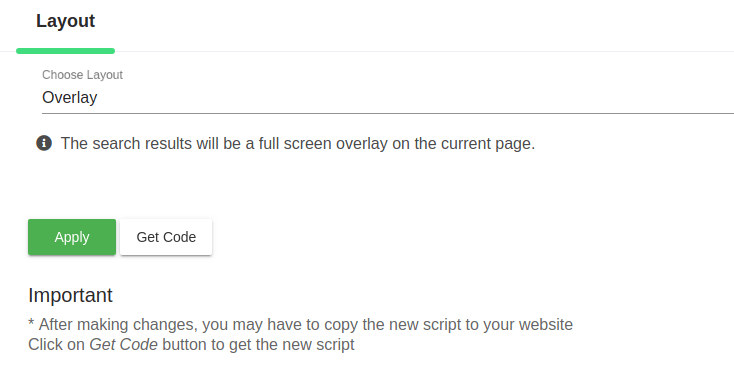
Option 1- Overlay mode (Search results on the same page).
This is the default mode. On pressing enter, search results will appear as a fullscreen overlay over the current page.
Option 2- Search results on different page (search results open on a new page)
Use this setting to display the search results on a separate page.
For example, if you want your search results to come in a page https://www.expertrec.com/search-results, then enter /search-results/ under the search result path.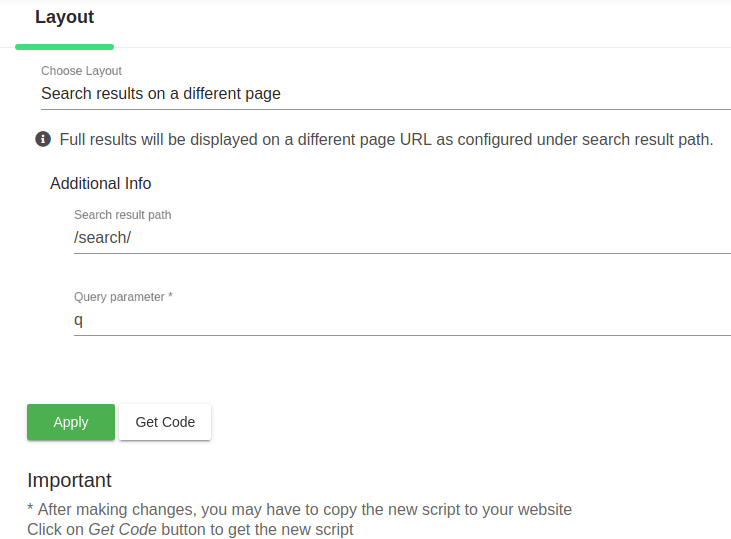 Enter your desired query parameter- q, (for WordPress usually it is s)
Now click on Apply.
Keep in mind that you will get a new piece of code to add to your search results page.
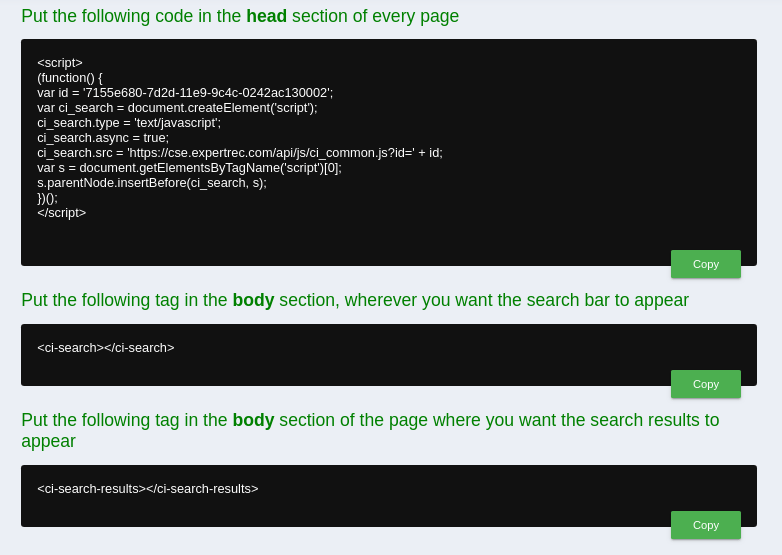
The <ci-search-results></ci-search-results> HTML code has to be added to your search results page for displaying the search results.
Results

For stores with more than just products, Expertrec recommends dedicating separate tabs in the Search Results for easy navigation. Content pages, Manuals, and Support documents are some examples of pages that are not product pages. Results from these pages can be contained under dedicated tabs which will improve searchability and navigation.