Help Center
-
Knowledge Base
-
-
-
- Articles coming soon
-
- Home
- Install Settings
- Merchandising
- Personalize
- Category
- NLP
- Script-Hooks
- Analytics
- Manage Users
- Agentic Search (AI-Powered Conversational Search)
- AI Synonyms
- Semantic Search
- AI Shop Assistant (Chat Widget)
- Recommendations Widget
- Advanced Filtering & Filter Trees
- Troubleshooting Guide
- Search Performance Optimization
- BigCommerce Search Integration
- WooCommerce Search Integration
- Getting Started with eCommerce Search
- Ecom Copilot (AI Sales Assistant)
- AI Filtering (Query Tagging and Intent Classification)
- Visual Merchandising (Product Pinning)
- Geo Merchandising
- A/B Testing
- Showcase Products (Zero-Character Search)
- Delete Products from Search Index
- Landing Pages
- Autocomplete Configuration
- Popular Suggestion Queries
- Tab Views
- Theme Setup
- Search Bar Integration
- Search Redirects
- Advanced Configuration (Search Weights)
- Matching Options
- Connect BigCommerce
- GDPR and Privacy Settings (Cookie Consent)
- Image Search (Visual Search)
- Smart Notifications (Back-in-Stock and Price Drop Alerts)
- Leverage GA4 Data (Google Analytics 4 Integration)
- Manage Users (Dashboard Access and Permissions)
- Reporting Overview
- Show all articles (28) Collapse Articles
-
-
- Install Settings
- Analytics
- Search settings
- Merchandising
- Category
- NLP
- Search-API info
- Manage Users
- Script-Hooks
- Personalize
- Agentic Search (AI-Powered Conversational Search)
- AI Synonyms
- Semantic Search
- Recommendations Widget
- Advanced Filtering & Filter Trees
- Troubleshooting Guide
- Search Performance Optimization
- WooCommerce Search Integration
- Show all articles (3) Collapse Articles
-
-
- Instructions to install app
- Home
- Install Settings [Shopify]
- Category
- Merchandising
- Search settings
- NLP
- Analytics
- Search-API info
- Manage Users
- Script-Hooks
- Personalize
- Agentic Search (AI-Powered Conversational Search)
- AI Synonyms
- Semantic Search
- AI Shop Assistant (Chat Widget)
- Recommendations Widget
- Commerce MCP Server (Shopify AI Tools)
- Advanced Filtering & Filter Trees
- Troubleshooting Guide
- Search Performance Optimization
- Ecom Copilot (AI Sales Assistant)
- Search Bar Integration
- Search Redirects
- Metafields and Tags (Shopify)
- Product Bundles (Shopify)
- Collection Pages (Shopify)
- GDPR and Privacy Settings (Cookie Consent)
- Image Search (Visual Search)
- Smart Notifications (Back-in-Stock and Price Drop Alerts)
- Leverage GA4 Data (Google Analytics 4 Integration)
- Manage Users (Dashboard Access and Permissions)
- Reporting Overview
- Show all articles (18) Collapse Articles
-
- Getting started
- Installation Guide
- Magento 2 Search Integration - Adobe Commerce edition
- Commerce MCP Server (Shopify AI Tools)
- BigCommerce Search Integration
- WooCommerce Search Integration
- Getting Started with eCommerce Search
- Connect BigCommerce
- Domain Allowlist (WordPress)
- Leverage GA4 Data (Google Analytics 4 Integration)
-
- Articles coming soon
-
< Back
You are here:
Print
Full Screen Search Box
Created On
Last Updated On
byExpertrec Marketing
The full-screen input box is the search box that loads when you enter a search query and hit enter.

Here are the features you can control-
- Search box styling
- Search box hover styling
- Input box container
- Search input styling
- Search result input hover styling
- Clear input styling- The button that closes the search engine
- Search button hover styling
- Search voice styling.
- Search voice hover styling
- Other properties-
- Placeholder text- the default text in the search box
- Voice button icon/text.
- Show search button- You can turn on or off
- Close button icon/text- you can enter fa icon code or text
- Search button icon/ text
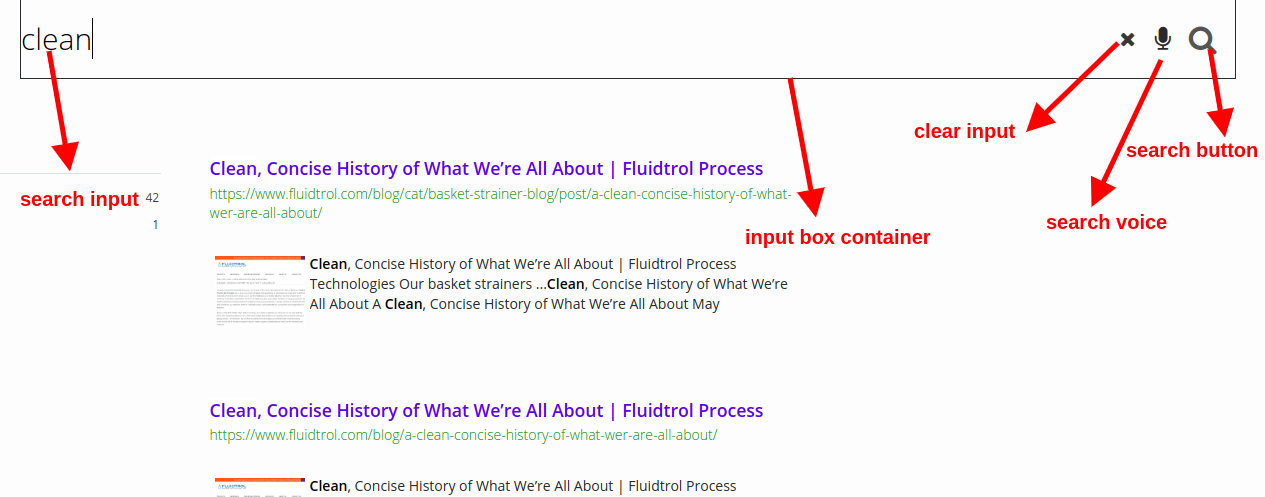
Table of Contents