

Here are steps to get your google custom search engine ID (CX Id). When you are formulating your google custom search.
 You dont want to miss this article on full text search engine.
You dont want to miss this article on full text search engine.
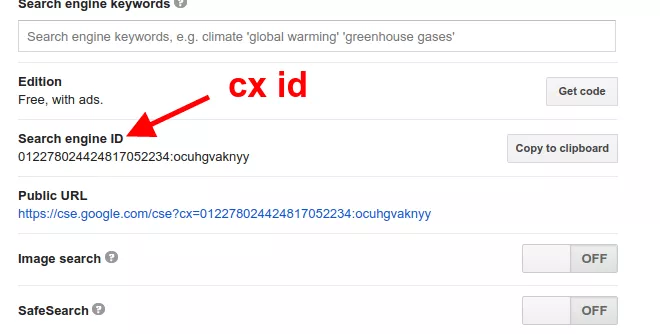
Steps to get Custom Search Engine ID
- Go to your google custom search control panel https://cse.google.com/cse/
- Go to setup-> search engine ID.

- Copy your Google custom search engine ID.
- This is your Google custom search id / CX id.

Add a search engine to your website at 9 USD per month
What is a Google Custom Search Engine ID (CX ID)?
The CX ID is a unique identifier for your Google Custom Search Engine. It is required when making API calls or embedding the search engine on your website. It looks like a string of numbers and letters separated by colons.
Where do I find my Google Custom Search Engine ID?
Log in to the Google Programmable Search Engine control panel at cse.google.com, select your search engine, and find the Search Engine ID (cx) in the Setup section under Basics.
How do I create a Google Custom Search Engine?
Go to cse.google.com, click Add, enter the sites you want to search, give it a name, and click Create. Your new search engine ID (CX) will be displayed in the control panel.


