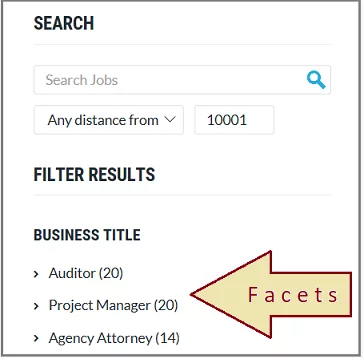
Faceted navigation works alongside traditional search techniques, allowing users to narrow down results by applying multiple filters based on the attributes (facets) of the search results. For example, /shoes?color=red&size=10 is a faceted URL generated when a user filters shoes by color and size. See our Shopify faceted search filters guide for a practical example. This means users can refine search results by clicking filter values, narrowing the navigation to a specific category or partition. Known as “guided navigation,” faceted search uses product attributes to display filtered results, helping consumers quickly navigate to a particular section of the product catalog. For an e-commerce site with many product catalogs, visitors need an intelligent search box that will easily lead them through the site. Users who search on Google and those who search on your website are two very separate groups of people. They’ve demonstrated interest in your site after they land on your site and begin using the search tool. 
What is a faceted search or faceted navigation?
User-tailored search is a search and navigation function that allows users to tailor search results to their specific interests by picking from several distinct attributes. These attributes are often divided into pre-defined facets that are granular and selected by the company. However, faceted search can also create SEO challenges such as duplicate URLs, wasted crawl budget, and thin content if not configured carefully. Managing these risks is just as important as delivering a great user experience. Using faceted search and navigation is an important part of search engine optimization. There is a significant reduction in the time required for users to find the information they seek by eliminating the need to scroll through results endlessly. Because of their smaller screens and slower network connections, mobile devices benefit most because they enhance their overall experience. Users are more engaged, which leads to more conversions when the search experience is simple and quick.
Why does a website need faceted browsing?
Your site’s facet filters should be flexible enough to accommodate the preferences of as many of your visitors as feasible. Understanding what your users are looking for is critical to developing the greatest faceted search possible. The use of search analytics is another effective strategy for accomplishing this goal. Finding out how consumers interact with your site, measured by metrics such as click-through rates, can help you better understand how your content can better serve their needs.
Solr faceted search
However, facets are supported in Solr, but setting them up from scratch isn’t easy. The difficult set-up process can be avoided by following these steps:
- Visit the site https://cse.expertrec.com/newuser?platform=cse to get started. Then use your Google ID to sign up.
- When prompted, type in the URL of your website and enter the URL of your sitemap.

- You can adjust the parameters and modify the user interface as the crawl progresses. If you want to see a working demo before directing people to your website, you can do so once the project is complete.
- Taking the search to your website requires little to no work. Copy and paste the code snippet from your dashboard into your website’s HTML code.
You may, of course, create your own Solr faceted search if you prefer.
Drupal faceted search
We will use the Google Tag Manager Drupal plugin to construct a Drupal faceted search and integrate it into your Drupal website. You may enable faceted search in the control panel as well.
- Go to the Drupal faceted search builder.
- Use your Gmail account to sign up.
- Enter the URLs for your Drupal website and sitemap here.
- The website crawl will begin.
- Upon completion of the crawl. Make a copy of the code in the code section.
- You may also want to look at a demonstration of how Drupal’s search function will seem.
WordPress faceted search
Step 1: WP Fastest site search must be installed first. The WP Fastest site search must first be downloaded, installed, and activated. Step 2: Design and Implement the Facet Filters Filtering or “drilling down” content listings can be done using WP fastest site search UI components (checkboxes, drop downs, etc.). Step 3: Configurations for WP Fastest Site Search This is the API Key that you need to add at Expertrec’s WordPress plugin, so click on that add this API key and save it. 
Shopify faceted search filters
Method 1: Expertrec Shopify’s clever search bar
- Install the Shopify app store’s Expertrec smart search bar.
- Following your installation, you will be taken to the Expertrec smart search bar control panel, where you must activate your search engine by a toggle on the enabled search extension (it will be enabled by default).
- Search results pages will display facets and filters once the app has been installed.

- Go to your Shopify account and log in.
- Enter the web address at https://www.expertrec.com/shopify/ of your Shopify store.
- Activate the installation by clicking on it.
- Install the unlisted software by clicking on it.
- Check out your Shopify search results now.
- Your Shopify store will now be equipped with the auto-complete bar.
- This is how the Shopify search results page will appear.
- The facets will be displayed on the left-hand side of the search results page, as shown in the illustration.
- On the Shopify search results page, there are filters and facets.

- Use your Google account to log in to the Expertrec custom search engine at https://cse.expertrec.com/?platform=ecom .
- Next, enter the URL of your Shopify store.
- Access to the Expertrec dashboard will be granted to you. You may copy the HTML code by clicking on Install -> Code.
- To access your Shopify admin panel, log in now.
- Click on Online Store -> Themes -> Edit code. In the Layouts folder, click on theme.liquid file.
- Paste in code in <head> section and the HTML tag in the <body> section between the two <div>. Save the code.
- Your online business will benefit from the Shopify faceted search filters and other features such as faster searches, voice searches, and search statistics after a fresh installation.

WooCommerce faceted search filters
- Go to https://cse.expertrec.com/newuser?platform=wordpress
- Crawl your website by entering its URL.
- Wait until all of your website’s pages have been crawled before making a change.
- Copy your site ID from https://cse.expertrec.com/csedashboard/home/Status?fr=wp_plugin
- In your WordPress admin panel, tap on the site search icon. Copy and paste your WordPress API key into this field.
- Using this plugin, your website’s search form will operate better.
- Just like that, a search form has been added to your WooCommerce store.
Faceted navigation best practices
Planning and iteration are necessary for a successful faceted search and navigation. However, there are a few things to keep in mind before you begin:
-
Use canonical tags to consolidate ranking signals from similar faceted URLs.
-
Block or noindex low-value filter combinations to avoid crawl bloat and duplicate content.
Consider the customer Your site’s facet filters should consider serving as many people as possible. To provide the best-faceted search possible, you need to know how and what your users are searching for. The use of search analytics is another effective strategy for accomplishing this goal. Finding out how consumers interact with your material, measured by metrics such as click-through rates, can help you better understand how your content can better serve their needs. Search analytics dashboard showing filters/facets Customers can learn about new items and services on your site because of the social proof provided by reviews and ratings, so don’t forget to incorporate this into your design. A higher facet count is preferred. To avoid overwhelming your clients, make sure your product has just the right number of features to suit their requirements. There are many factors to consider while deciding how many elements to include in your application. Unnecessary or unutilized features might overwhelm users with many options to choose from. Analyzing your search data means keeping an eye out for underutilized areas and removing them as necessary. In addition, the facet options should dynamically adjust to the user’s typing so that only relevant alternatives are shown. For example, facet selections should offer color, price, and brand, but not shoe size filters, when a user searches for a shirt.
How to add faceted search to your Expertrec custom search engine?
Search results can be narrowed using Facets based on file type or other metadata. (For instance, a PDF or image) Multiple-choice searching. When you use expertrec custom search, certain features like PDF and HTML applications are enabled by default. Follow the methods listed below to add, remove, or change the appearance of any facets.
- Your custom search engine should be set up from https://cse.expertrec.com/?platform=cse before you can use it.
- Take a look at the results of your site crawl.
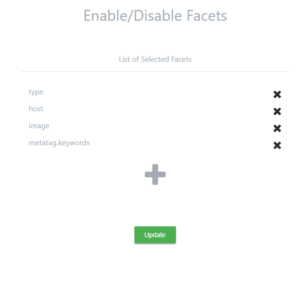
- Go to UI customization -> facets.
- The facet “type” is enabled by default.
- Make use of the plus sign (+).
- There are several fields that you can select from here. (Not all fields can be used)
- Here is a list of facet fields that can be used and what they are used for –
- A web host is where your website resides (if you have more than one website crawled).
- Image
- meta tag keywords
FAQ
1. Can I use my search bar’s filters instead of a faceted search? To use facets, your catalog should have at least 100 items. Even filters may be too much for you, as all of your products will fit on just a few pages. Though your clients know exactly what they want, rudimentary filters won’t be enough for massive sites. Instead, users can focus their search with the help of sorting and filtering, which falls under the umbrella term “facets.” 2. What is the difference between filters and facets? To save time and effort, shoppers can use filters to focus their search results on specific products, such as kitchen equipment or cookbooks. It’s important to note that only one generic filter can be used at any given moment. A faceted navigation system uses numerous filters simultaneously, each of which can be applied to specific properties of a given product. As a result, customers will have an easier time finding the specific item they desire. 3. How many facets should I be using? Although it may seem basic, it is important to keep your filters balanced. Your consumers will be less likely to find what they’re looking for if you give too few options. On the other hand, if customers still have to sift through hundreds of items after applying all the filters, it could be good to broaden the scope of the searchable attributes you offer. 4. Does faceted search impact SEO rankings?
Yes. When configured correctly, faceted search improves user experience and conversions. But if left unchecked, it can waste crawl budget and create duplicate content. Following best practices like canonical tags and noindexing low-value pages helps maintain rankings.
Related Faceted Search Guides
- Faceted Navigation SEO Best Practices
- Dynamic Faceting: Guide to Smarter Product Discovery
- Facets vs Filters: What is the Difference?
- Shopify Faceted Search Filters
- Mastering Search Facets for Ecommerce
Faceted search is a filtering technique that allows users to narrow down search results by selecting multiple attributes or categories simultaneously. For example, on an ecommerce site, shoppers can filter by price range, brand, color, and size at the same time.
Faceted search dynamically generates filter options based on the current result set and shows the count of matching items for each option. Basic filtering uses static predefined options. Faceted search is more interactive and helps users understand what is available.
Faceted search helps customers find products faster by letting them narrow results using relevant attributes. This reduces search abandonment, increases product discovery, and leads to higher conversion rates, especially in stores with large catalogs.