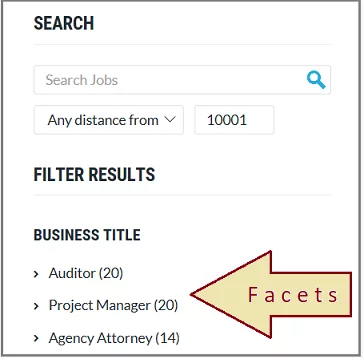


Filters
More on Filters:- Filters are parent categories, applied upon which unmatching pages or content will be eliminated from results immediately.
- Filters never change between searches, unlike facets change based on what are search results actually.
- Filters can be applied before entering a search query and after search results are shown.
- Filters must cover more general criteria, to cover all results for a search query.

Facets
More on Facets:- Facets can be a group of filters.
- Facets remain the same for a search query.
- Facets depend upon search results. Different Facets will be shown for a different query. Ex. for books query “author”, “type” will be on top and for mobiles related query brand, price, features(ram, display) will be on top.
- Facets can be more specific to a set of products, unlike filters.

What next? Should I use them on my website?
We have seen the importance of the filtering feature and its subset facets. Such a structure to help users is needed for e-commerce websites. Facets will incur costs in designing and maintaining UI( user interface), maintaining and supporting future content, etc. But this extra cost will help your users for easy interaction, saves time( user will not make an extra query). More importantly, it will make a user-friendly website, and users will revisit the website because of such an intuitive experience. For e-commerce site standard Facets will be “category”, “brand”, price, color, etc. For other sites, facets will consist of one or more attributes that can classify your catalog results. For ex, for blog sites, years of publishing, the blog category will come in facets. So the feature is great and useful and ExpertRec provides it out of the box. You can define facets as you need. There is support for customizing visual representation as per your site. You choose the facet fields, and you will be able to select the widget accordingly. Further customizing of the particular widget is also supported. Happy Searching…!For a comprehensive overview of faceted search, see our complete faceted search guide.
Facets are dynamic filter options generated from the search results that show available values and counts. Filters are predefined criteria applied to narrow results. Facets adapt to the current result set, while filters remain static regardless of what is being searched.
Use facets when you want to show users what options are available within their current results, with counts for each option. Use simple filters when you have a small, fixed set of categories. Ecommerce sites with large catalogs benefit most from faceted navigation.
Facets help users understand the composition of search results at a glance, make informed filtering decisions based on available options and counts, and progressively narrow results without hitting dead ends.


