


Building Web crawler Search Engine is an extremely complex engineering project. Trying to build a web crawler can provide can give a great understanding of how a web crawler search engine works. There are multiple huge, complex components involved in building a search engine crawler.
To build a complete search engine, you would need the following components
What is a Web Crawler?
There are around 1.88 billion websites on the internet. The crawler visits each one of the websites and collects information about each website, and each page in a website, periodically. It does this job so that it can provide the required information when a user asks for it.
Crawler architecture
Here is a typical crawler architecture.

Crawling Process

URL Frontier and Crawl Scheduling
A critical component of any web crawler is the URL frontier — the data structure that holds all URLs waiting to be crawled. A well-designed frontier does more than just queue URLs. It prioritizes which pages to crawl first based on factors like page importance, freshness requirements, and domain politeness rules.
The frontier typically uses a priority queue where high-value pages (home pages, frequently updated content) are crawled first. It also enforces crawl delays per domain to avoid overwhelming any single server. Most production crawlers maintain separate queues per domain and rotate between them to distribute load evenly.
For scheduling recrawls, the crawler tracks how often each page changes and adjusts its revisit frequency accordingly. Pages that change daily get crawled more often than static pages. ExpertRec’s crawler handles all of this automatically — you can configure your recrawl schedule from the control panel without writing any code.
How does a Web Crawler work?
Web crawler works by first visiting a website root domain or root URL, say https://www.expertrec.com/custom-search-engine/. It looks for robots.txt and sitemap.xml. robots.txt provides instruction for the crawler, web crawler instructions like not to visit a particular section of the website using disallow section. Website creators use this file to give instructions to search engines like what kinds of information can be collected or gathered.
After completing the visit of robots.txt, it looks for sitemap.xml. Sitemap.xml contains all the URLs of the website and also instructions to search engines or crawlers on how frequently that particular page should be crawled. A sitemap is mainly used for easy link findability and to prioritize the contents on the website that should be crawled.
What is Search Index?
Once the crawler crawls the web pages in a website, All the information like Keywords on the website, meta-information (information about) a page like meta description, etc. are extracted and put in an index. This index can be compared to an index that can be found in every book, that can be used to lookup up the exact page number and hence the information about the keyword to retrieve results faster.
What is Search Ranking?
Every time when a user searches for information, the search results are produced by looking up the index and many other signals like your location from which you query, These extra signals help in producing better search results
Web Search User interface
Most users search in browsers or mobile apps through the search engine interface. This is usually built using JavaScript.
Some pointers to keep in mind while designing a good Web Crawler for searching the web.
- Ability to download huge web pages
- Less time to download web pages
- Consume optimal bandwidth.
- Handle HTTP 301 and HTTP 302 Redirects- The crawler should be able to handle such pages.
- DNS caching – Instead of doing a DNS lookup every time, the crawler should cache the DNS. This helps to reduce the crawl time and internet bandwidth used.

reducing DNS caching - Multithreading-Most crawlers launch several “threads” in order to download web pages in parallel. Instead of a single thread downloading the files, you can use this approach to parallel fetch multiple pages.

multithreaded web crawler search engine - Asynchronous crawl– Asynchronous crawling, since only one thread is used to send and receive all the web requests in parallel. This saves RAM and CPU usage. Using this we can crawl more than 3,000,000 web pages while using less than 200 MB of RAM. Using this, we can achieve a crawl speed of more than 250 pages per second.
- Duplicate detection – The crawler should be able to find duplicate URLs and remove them. When a website has more than one version of the same page, the Crawler should find the authoritative page of all the versions, even if the website creator does not provide a canonical URL for the web page. Canonical URLs are the authoritative URL that search engines should look for when the website creators create multiple versions of the same web page. Website creator marks canonical URL by adding link tag in all the duplicate pages as follows.


- Handing Robots.txt – The crawler should read the settings in the robots.txt for crawling the pages. Some pages (or page patterns) will be marked as Disallow and these pages should not be crawled. Robots.txt will be found at website.com/robots.txt

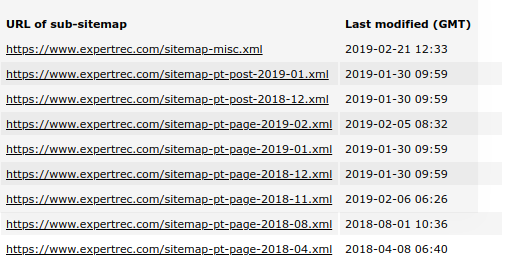
robots.txt - Sitemap.xml- Sitemap is a link map of the website. It has all the URLs that need to be crawled. This makes the crawling process simpler.

sitemap - Crawler policies-
- selection policy, which states which pages have to be downloaded.
- a re-visit policy that states frequency to look for changes on the website.
- a politeness policy How fast the website can be crawled (so that website load does not increase)
- a parallelization policy Instructions for distributed crawlers.

Building an Inverted Index
Once your crawler has collected web pages, you need to build a search index that allows fast lookups. The most common approach is an inverted index, which maps every unique word to the list of documents containing it.
For example, if page A contains “best running shoes” and page B contains “best hiking shoes,” the inverted index would map “best” to [A, B], “running” to [A], “hiking” to [B], and “shoes” to [A, B]. When a user searches for “best shoes,” the engine looks up both terms and finds pages A and B instantly, without scanning every document.
Production search engines like Elasticsearch and Solr handle index building automatically. If you are building from scratch, libraries like Apache Lucene provide the low-level indexing primitives you need.
System Design Primer on building a Web Crawler Search Engine
Here is a system design primer for building a web crawler search engine. Building a search engine from scratch is not easy. To get you started, you can take a look at existing open source projects like Solr or Elasticsearch. Coming to just the crawler, you can take a look at Nutch. Solr doesn’t come with a built-in crawler but works well with Nutch.
Best Practices for Ethical Web Crawling
Building a web crawler comes with responsibility. Here are essential practices to follow:
- Respect robots.txt: Always check and obey the robots.txt file before crawling any page. Ignoring it can get your crawler blocked or lead to legal issues.
- Set a descriptive User-Agent: Identify your crawler with a clear User-Agent string that includes contact information, so site owners can reach you if needed.
- Implement rate limiting: Add delays between requests to the same domain (typically 1-2 seconds minimum). Never hammer a server with rapid-fire requests.
- Handle errors gracefully: Implement exponential backoff for failed requests. If a server returns 429 (Too Many Requests) or 503 (Service Unavailable), slow down or stop crawling that domain temporarily.
- Avoid crawler traps: Some websites have infinite URL patterns (like calendar pages that generate URLs for every future date). Set maximum depth limits and detect URL patterns that generate unlimited pages.
If building and maintaining a crawler sounds complex, that is because it is. Services like ExpertRec’s crawler handle all of these challenges automatically, letting you focus on your search experience instead of infrastructure.
What are some open source web crawlers you can use
- nutch
- Scrapy
- Heritrix
- wget
- StormCrawler
Expertrec is a search solution that provides a ready-made search engine (crawler + parser + indexer + search UI). You can create your own at https://cse.expertrec.com/?platform=cse
Frequently Asked Questions
Search engine crawlers start by downloading a website’s robots.txt file to learn which pages they are allowed to crawl. They then check the sitemap.xml for a list of URLs. The crawler visits each allowed page, extracts text and metadata, follows links to discover new pages, and sends everything to the search index. Crawlers use algorithms to decide how often to revisit each page based on how frequently it changes.
To build a basic web crawler, start with a list of seed URLs. For each URL, download the page content, extract the text and links, add new links to your crawl queue, and store the extracted data in a search index. Key components include a URL frontier for scheduling, an HTML parser for content extraction, a duplicate detector, and a politeness module to avoid overloading servers.
A web crawler is one component of a search engine. The crawler’s job is to discover and download web pages. A complete search engine also includes an indexer that organizes the crawled data, a ranking algorithm that determines result order, and a user interface for searching. The crawler gathers the raw data, while the search engine makes that data searchable and useful.
Python is the most popular choice for building web crawlers because of libraries like Scrapy, Beautiful Soup, and Requests. Java is used for large-scale production crawlers like Apache Nutch. Go and Rust are good choices when performance and concurrency are priorities. The best language depends on your scale — Python works well for small to medium crawlers, while Java or Go are better for crawling millions of pages.
Crawl time depends on the website size and your crawler’s speed. A small website with 100 pages can be crawled in under a minute. A medium site with 10,000 pages might take 30 minutes to a few hours, depending on politeness delays. Large sites with millions of pages can take days or weeks. ExpertRec’s crawler can index most websites within a few hours and supports configurable recrawl schedules.


